
In 2026, voice changers have become essential tools for social media marketers, streamers, gamers, and content creators who want to add personality, privacy, or creative flair to their audio. While Voicemod remains popular for real-time effects, many professionals are turning to alternatives due to its higher resource demands, subscription pricing, occasional bugs, and the growing need for more advanced AI features, cross-platform support, and lower latency.
Whether you’re producing engaging TikTok videos, hosting live Discord sessions, streaming on Twitch, or creating professional voiceovers for marketing campaigns, the right voice changer can elevate your content without compromising performance. In this guide, we explore the top Voicemod alternatives in 2026 — a curated mix of free and paid options with strong AI capabilities, real-time processing, and practical features tailored for SMM pros and creators. We’ve focused on tools that deliver reliability, ease of use, and measurable results.
Why Consider Voicemod Alternatives in 2026?
Voicemod excels in fun, meme-style voices, but users frequently report high CPU usage during long streams, limited customization in the free tier, and fewer enterprise-grade AI options. Modern alternatives address these pain points with:
- Ultra-low latency for seamless live streaming
- Advanced AI voice cloning and text-to-speech (TTS)
- Better cross-device compatibility (Windows, Mac, mobile)
- Stronger privacy controls and ethical AI safeguards
Let’s dive into the best options, grouped by use case.
Best Free Voicemod Alternatives in 2026
These zero-cost tools are perfect for beginners or budget-conscious creators testing the waters.
- Clownfish Voice Changer Still one of the simplest system-wide voice changers for Windows, Clownfish runs in the background and works with any app — from Discord and Zoom to OBS Studio. It offers pitch shifting, robot effects, and echo without installing heavy software. Actionable tip: Ideal for quick SMM experiments like anonymous voice notes on Instagram Stories. Pair it with your existing mic setup for instant results — no learning curve.
- iTop Voicy A lightweight AI-powered free voice changer built for Windows 10/11 gamers and streamers. It includes over 100 preset AI voices (Minions, robotic, celebrity-inspired) with zero-latency real-time transformation. Pro insight: Great for short-form content creation where you need fast voice modulation without draining your PC’s resources.
Best Paid Real-Time Voice Changers (Real-Time AI Focus)
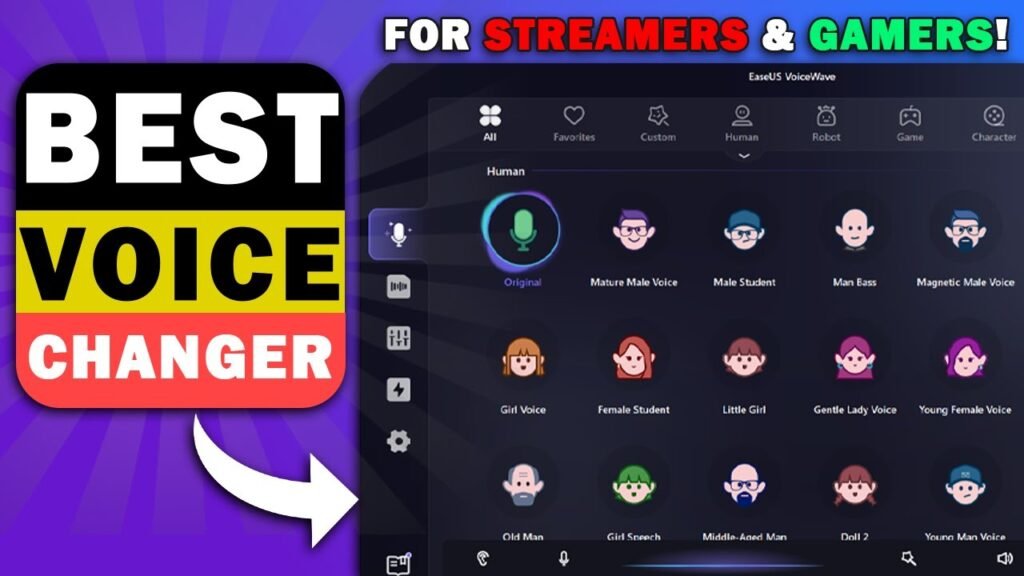
For streamers and live creators who need professional-grade performance, these stand out.
- EaseUS VoiceWave Frequently ranked as the top real-time AI alternative in 2026, EaseUS VoiceWave delivers ultra-low latency, realistic AI voices, and smooth integration with Twitch, Discord, Valorant, and OBS. It supports 300+ built-in voices plus 200+ AI-generated ones, with guided onboarding that gets you live in minutes. Actionable tip for SMM pros: Use its soundboard for branded effects during product launch live streams — perfect for boosting audience engagement on YouTube or TikTok Live.
- iMyFone MagicMic Cross-platform champion (Windows, Mac, Android, iOS) with 225+ voice effects and 600+ sound effects. It shines in real-time gaming, chatting, and streaming, offering customizable filters and frequent 2026 updates. Example: Content creators use MagicMic to switch between character voices mid-podcast or during collaborative Reels, keeping viewers hooked.
- Voice.ai Powered by advanced neural networks, this tool provides low-latency real-time transformation ideal for live streaming and gaming. It’s especially strong for natural-sounding voice disguises and creative effects. Insight: Streamers on low-end PCs love it for minimal resource usage while maintaining broadcast-quality audio.
- MorphVOX Pro A longtime favorite with background noise reduction and a wide library of voices and sound effects. It integrates effortlessly with most streaming software. Tip: Combine with your marketing videos to create distinct brand personas without recording multiple takes.
Best AI-Powered Professional Voice Changers for Content Creation
When your work shifts from live gaming to polished marketing assets, these AI-focused tools deliver studio-quality results.
- Murf.AI Excels in text-to-speech with hyper-realistic AI voices — perfect for explainer videos, podcasts, and e-learning content. Its intuitive editor lets you add background music and fine-tune pacing. SMM pro tip: Generate multiple language versions of your brand voiceovers in minutes, expanding reach on global social platforms.
- Resemble.AI Specializes in voice cloning, letting you create synthetic versions of your own voice or entirely new personas. Enterprise-ready with strong emotion control and API support. Use case: Marketers clone a consistent brand ambassador voice for consistent storytelling across LinkedIn videos and ads.
- ElevenLabs Industry-leading for cinema-grade voiceovers, multilingual support, and emotional expression. Its speech-to-speech features make it a favorite for dubbing and high-production social content. Insight: Creators report faster workflow when turning scripts into engaging audio for Instagram Reels or YouTube Shorts.
- Speechify Voice Over Studio Combines TTS with voice modification and 200+ natural-sounding voices. Excellent for audiobooks, presentations, and professional narration.
Quick Comparison: Choosing the Right Voicemod Alternative
| Tool | Best For | Platform | Pricing (2026) | Standout Feature | Latency |
|---|---|---|---|---|---|
| EaseUS VoiceWave | Real-time streaming | Windows | From $14.95/mo | 500+ AI voices, low CPU | Ultra-low |
| iMyFone MagicMic | Cross-platform fun | Win/Mac/Mobile | From $9.99/mo | 800+ effects | Low |
| Clownfish | Free & simple | Windows | Free | System-wide | None |
| Murf.AI | Professional TTS | Web/Desktop | Free trial + paid | Studio-quality editing | N/A |
| Resemble.AI | Voice cloning | Web/API | Pay-as-you-go | Emotion & cloning | Low |
How to Choose the Best Voice Changer for Your Needs
- For live streaming/gaming: Prioritize low-latency real-time tools like EaseUS VoiceWave or MagicMic.
- For marketing content: Go with AI TTS leaders like Murf.AI or ElevenLabs for polished voiceovers.
- Budget tip: Start with free tiers (Clownfish or iTop Voicy) and upgrade only when you need advanced AI cloning or mobile support.
- Privacy check: Always review data policies — especially with voice cloning tools — to protect your brand voice.
- Test drive: Most offer free trials or limited versions. Run a quick Discord or OBS test to check compatibility with your setup.
Final Thoughts: Elevate Your Voice Game in 2026
The best Voicemod alternatives in 2026 offer more than just voice effects — they provide smarter AI, better performance, and tools tailored to modern content creators and social media marketers. Whether you need free simplicity or enterprise-grade AI voice cloning, there’s an option here that fits your workflow perfectly.
Start experimenting with one or two from our list today. The right voice changer can transform how your audience connects with your content — making your streams more entertaining, your videos more professional, and your brand more memorable.
At SMMPro, we’re all about giving creators the edge they need. Which alternative are you trying first? Drop your thoughts in the comments, and stay tuned for more practical guides on audio tools, content strategy, and social growth in 2026.
Frequently Asked Questions
Yes, the top voice changers in 2026 are completely legal and safe when used responsibly. Tools like EaseUS VoiceWave, iMyFone MagicMic, and Murf.AI include enterprise-level security, clear data policies, and ethical AI guidelines. For commercial content, always disclose when using altered voices to maintain transparency and build trust with your audience.
Clownfish Voice Changer remains the go-to fully free option for simple, system-wide voice modulation on Windows. For more AI-powered features without spending anything, iTop Voicy delivers 100+ realistic presets with zero latency — perfect for quick tests or short-form SMM content.
Absolutely. iMyFone MagicMic offers full real-time support across Android and iOS, while dedicated mobile apps like Voice Changer by AndroidRock work great for on-the-go recording and editing. This makes them ideal for creating TikTok or Instagram Reels directly from your phone.
Yes — most modern alternatives integrate seamlessly. EaseUS VoiceWave and iMyFone MagicMic work flawlessly as input devices in Discord, Twitch, OBS, TikTok Live, and Instagram. Just select the voice changer as your microphone source, and you’re ready to go live with zero extra setup.
They generally outperform Voicemod in 2026. Tools like EaseUS VoiceWave and MagicMic use far less CPU and RAM, deliver ultra-low latency (under 500ms), and rarely cause crashes during long streams or gaming sessions — a common pain point with Voicemod.
Some free options (like Clownfish) are more basic with fewer voices, while premium tools may require a subscription for full AI features. Always check real-time capability if you need live streaming — not every mobile app supports it. Most users find the trade-offs worth it for better stability and modern AI voices.
Definitely. Many top tools, including MagicMic, Resemble.AI, and EaseUS VoiceWave, let you build and save custom voices, adjust pitch, speed, and effects, and even clone your own voice for consistent branding across campaigns.
Focus on your main use case: real-time low-latency tools for live streaming, advanced AI cloning for professional videos, or simple free options for testing ideas. Check compatibility with your setup, read recent user reviews for 2026 updates, and start with free trials to ensure it fits your workflow.

What do you think?
It’s fascinating how voice changers are becoming essential for both creativity and privacy in online content. The focus on cross-platform support and low latency really shows how much users value performance and flexibility. I’m curious to see what new creative applications will emerge as these tools evolve.